Logo Generator
From SVG Concepts to Brand Presentations
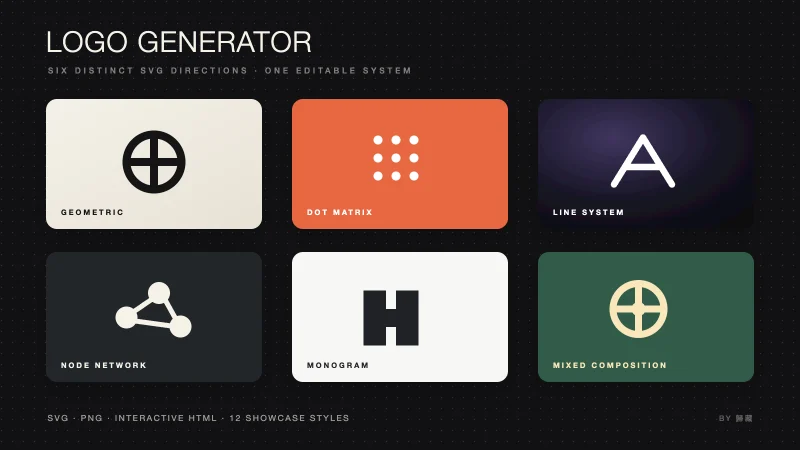
Compare six distinct mark structures, refine the selected directions, then optionally export PNGs and four background presentations.
Hosts listed by the author
- Claude Code
- GitHub stars
- 2,310
- Checked
- Categories
- Design & Video
Choose the mark before dressing it for a presentation.
Start with six black-and-white SVG directions and a comparison page. Check that each structure survives at icon size and has a distinct rationale, then refine two or three. PNG conversion and paid image generation can come later.
Pick a task and get started
Install below, then launch Claude Code in a separate brand working folder. Start with SVG concepts; prepare Python and service configuration only for the export or presentation routes. Terminal examples use macOS/Linux paths. Windows users need their actual skill and virtual-environment paths.
Provide a brand brief and placements, then compare monochrome structures without calling an image API.
Install the complete skill for Claude Code
Requires Git and an unused destination. This follows the author’s Claude Code location and pins the reviewed commit; retain the full directory. It does not install Python packages, configure the API or generate images.
Read the author’s setup guidegit clone https://github.com/op7418/logo-generator-skill.git ~/.claude/skills/logo-generator git -C ~/.claude/skills/logo-generator checkout bf4e9ac4d4428bda261afcfe981871ceb92d94e6Confirm discovery and keep outputs in a separate folder
Start or restart Claude Code in the folder for your brand files and enter /logo-generator to confirm discovery. Ask it to read SKILL.md and locate references, assets and scripts. Save work under logo-work/ in the project, not in the skill’s reference library. If the skill is missing, check ~/.claude/skills/logo-generator/SKILL.md and the directory nesting.
Claude Code skill locations and invocationGive your AI this first task
These are editorial exercises based on the author’s files. NoteFlow and logo-work/ are example names and paths, not an author case study or a tested result. Supply your own brief, and mark only files actually created, opened or checked as complete.
/logo-generator The complete skill is installed as described on this page. Read SKILL.md, references/design_patterns.md and assets/showcase_template.html, and confirm that you can write to the current working folder. For this exercise, NoteFlow helps readers connect reading excerpts into personal notes. The core idea is “connection without interrupting reading.” The mark will appear in a website header and as a small icon. Use restrained monochrome geometry; avoid stock books, generic brain symbols and imitation of established brands. Replace this brief for a real project; ask about missing decisions first. Create six structurally distinct directions using geometry, dots, lines and combinations. Do not count rotations, recolours or repositioning of one mark as new concepts. Give each direction a sentence linking it to the core idea and a likely small-size tradeoff. Save logo-work/concepts/v01.svg through v06.svg with a 0 0 100 100 viewBox and currentColor for monochrome styling. Give each concept its own IDs when using defs or clipPath. Build a real logo-work/concepts/index.html from the template, replacing the product name, components, data and all remaining placeholders. Include the six SVGs and rationales, black/white reversal, 16/64/512-pixel comparisons and links to the actual files. Implement any missing comparison or download features rather than assuming they already exist in the template. State its external CDN dependencies. Open the page and check placeholders, rendering, narrow screens and links. Inspect each small mark for clogged gaps, disappearing lines and clipped shapes. If you cannot preview it, list those checks as pending. Deliver the SVGs, page path and check results, then ask me to choose two or three directions. Do not configure Gemini or generate background images.
Check what you receive
- Six structurally different SVGs with concept rationales.
- A populated HTML comparison page with working file links.
- Size, monochrome and page checks, plus directions awaiting selection.
More about this skill
Logo Generator is a skill named logo-generator by 歸藏. It asks a coding assistant to understand the product name, industry, core idea and visual preferences, then explore at least six SVG marks through geometry, dots, lines and mixed structures. The host assistant writes the SVGs, explains the concepts and assembles the comparison page; the repository does not contain a standalone algorithm that generates the marks.
There are four kinds of deliverable. SVG holds the editable mark. HTML supports comparison and links to the files. A CairoSVG helper converts the chosen static SVG to PNG. A Gemini helper sends that PNG, the brand name and description to an image service for a textured presentation with lighting and small typography. Its request for a vector look still produces a PNG.
This guide offers four routes: six concepts, targeted refinement, exact-size export and a four-style presentation. The author also includes six WebGL background demos. They require adaptation and testing; they are not a finished site generator or video exporter.
Sources and verification
Sources checked
We read all 12 author files at the pinned commit and cross-checked official host, dependency and model material. We did not run the helpers, call an image service or assess generated output quality.