An unofficial workflow with separate image and desktop stages
Heytea Style
Photo Posters, Characters and Desktop Pets
Start with a clear photograph: keep its object in a doodle poster, or design a flavor monster and extend the approved identity into a fusion poster or desktop pet.
 Open original
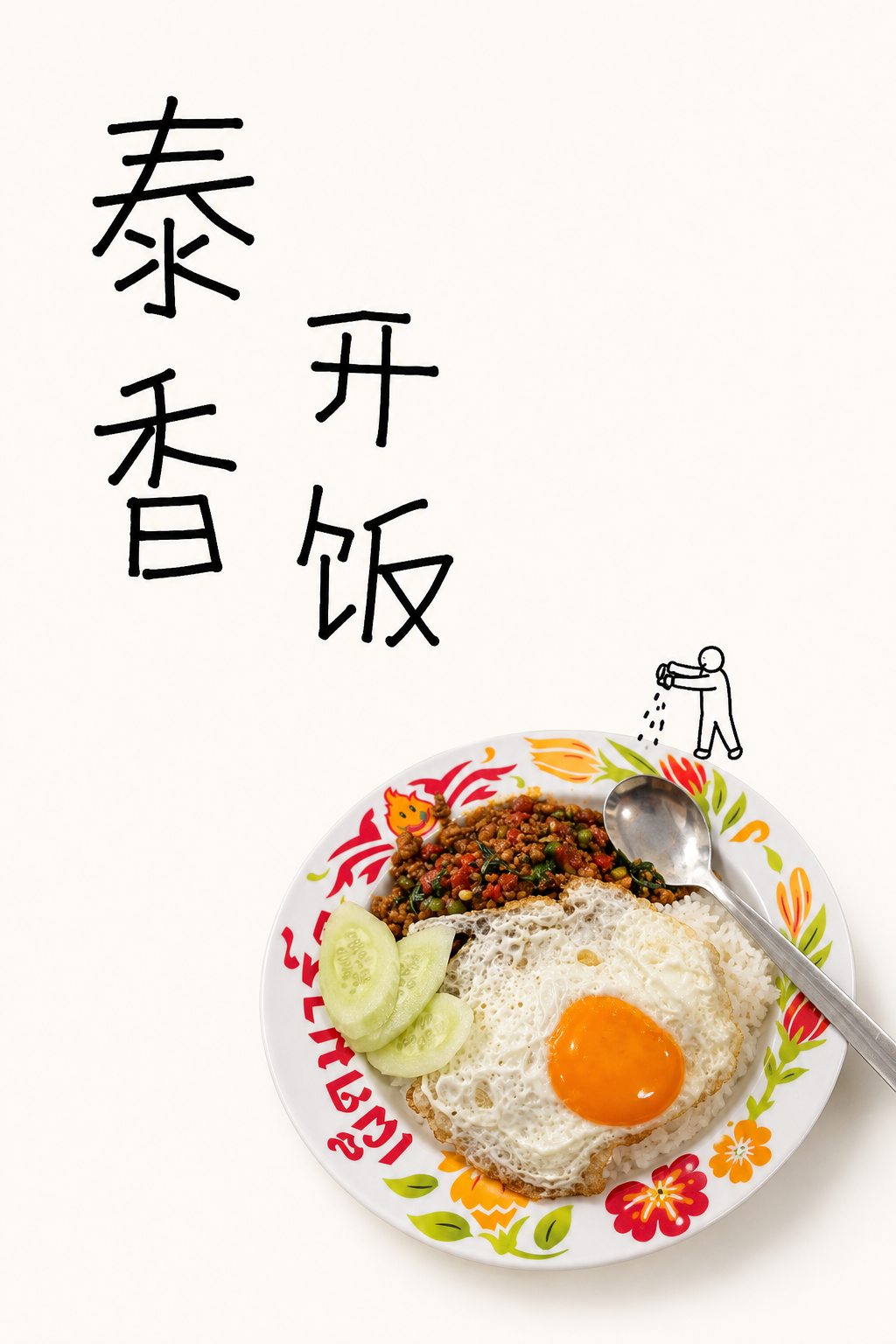
The author selects a food plate from the table photo and leads with two columns of Chinese lettering and a small sprinkling worker. Printed marks remain on the photographed plate.
Author originalOriginal examples by heytea-style contributors, CC BY 4.0, reproduced unchanged. These are unofficial repository examples, not official HEYTEA work or results generated here. The two outputs select a plate and a basket from the same multi-object table photo.
Environment
- Codex
- Image generation/editing tools
- Desktop runner: macOS / Windows
- GitHub stars
- 334
- Version
- 2.0.0
- Checked
- Categories
- Design & Video
Start with one wordless poster
Use a clear photo of one object without prominent branding and choose one action. Establish the relationship between the photograph and doodle before adding handwritten titles, a new character or a desktop runtime.
Pick a task and get started
Prepare a photo, Git, Python and a Codex session with image tools, then install the skill below. Begin with Wordless poster. Character creation, fusion posters and runnable pets have additional prerequisites.
For a first attempt, choose a clear photo of one food or everyday object without prominent branding. Let one small worker’s action carry the story.
Install the skill and image-processing dependency
These first-install commands use macOS/Linux shell syntax. On Windows, use your actual Codex skills directory and available Python command. The folder and invocation name are heytea-doodle-poster. The checkout pins this review’s source; reopen Codex afterward. Use Python 3.10+ for the scripts. Requirements specify Pillow>=10.4,<13 and do not install the desktop runner. Run later scripts/ commands from this skill directory; check your version first if it already exists.
Read the author’s setup guidegit clone https://github.com/Hchen1218/heytea-style.git ~/.codex/skills/heytea-doodle-poster cd ~/.codex/skills/heytea-doodle-poster git checkout d5125372adcc945c2314cfb649c50407379a18ab python3 -m pip install -r requirements.txtFirst request: upload a photo and choose the wordless route
Reopen Codex, attach one clear photograph you have permission to use, and send the Wordless poster request below using the name heytea-doodle-poster. Confirm that the session has image-generation or editing capability and check your credits. If no image tool is available, the author permits a staged prompt packet with ungenerated artifacts clearly identified. Installing the skill and Pillow does not supply a model.
Read the actual entry and output rulesGive your AI this first task
These editorial requests follow the pinned source and are not results generated here. Attach real inputs; identity and motion approval happen in separate turns.
Use heytea-doodle-poster to make one wordless poster from my uploaded single-subject photograph. I have already chosen the wordless route, so do not repeat the entry chooser. Check that the subject is usable; if the photo actually contains several independent subjects, ask me to select one. Preserve the object’s photographic silhouette, color, material and natural shadow. Replace the busy surroundings with white or warm white. Prefer a 2:3 portrait canvas, using 1024×1536 if the tool supports it. Keep the object around 25%–45% of the canvas height. Add one faceless black-line micro-worker performing a single action: climbing to inspect it. Include a ladder only if the action needs one. Use broken strokes, hard turns and imperfect joins rather than a cute mascot. Reserve no title box and add no text, numbers, logos or unrelated props. Check object fidelity and whether the action reads at a glance, then deliver the image. If image generation is unavailable, identify the prompt plan and artifacts that remain ungenerated.
Check what you receive
- Expect a vertical poster combining a photographic object with one black-line worker, with whitespace organized around the action.
- Compare shape, material, color and shadow with the original. The worker should make clear contact or establish a readable action with the object.
- Check for invented text, brand marks and watermarks. A prompt plan must be identified as unrendered; a downloadable image is the visual deliverable.
More about this skill
Heytea Style is an unofficial visual-research and creative project by Hchen1218. Ordinary posters keep a photographed object’s material and place small black-line workers around it on a generous white field. The text version is led by crooked Chinese handwriting; the wordless version is led by one action. Each receives its own composition rather than sharing a base with a title switched on or off.
A usable photo comes first. If you upload one without specifying an output, the current SKILL offers a text poster, a wordless poster or one static flavor monster. An explicit request goes straight to its route. A flavor identity begins with a black-line master and a color pass that preserves the accepted lines. After approving it, you choose a fusion poster, a runnable pet or both.
The repository includes style, lettering and material rules, Pillow processing scripts and an Electron desktop runner. Its scripts combine existing title artwork, prepare frames and build packs; image creation still requires a model tool. Posters and static characters can stand alone. Runnable pets add environment checks, motion approval, transparent-asset validation and a real desktop test.
Sources and verification
Sources checked
We read 27 complete documents, configurations and scripts and visually inspected four original author images. No upstream code, runtime installer or image model was executed. Commands were checked statically; displayed results belong to the author.