One photograph, two ways of seeing
Photo Abstract Editorial
Photo and Abstraction
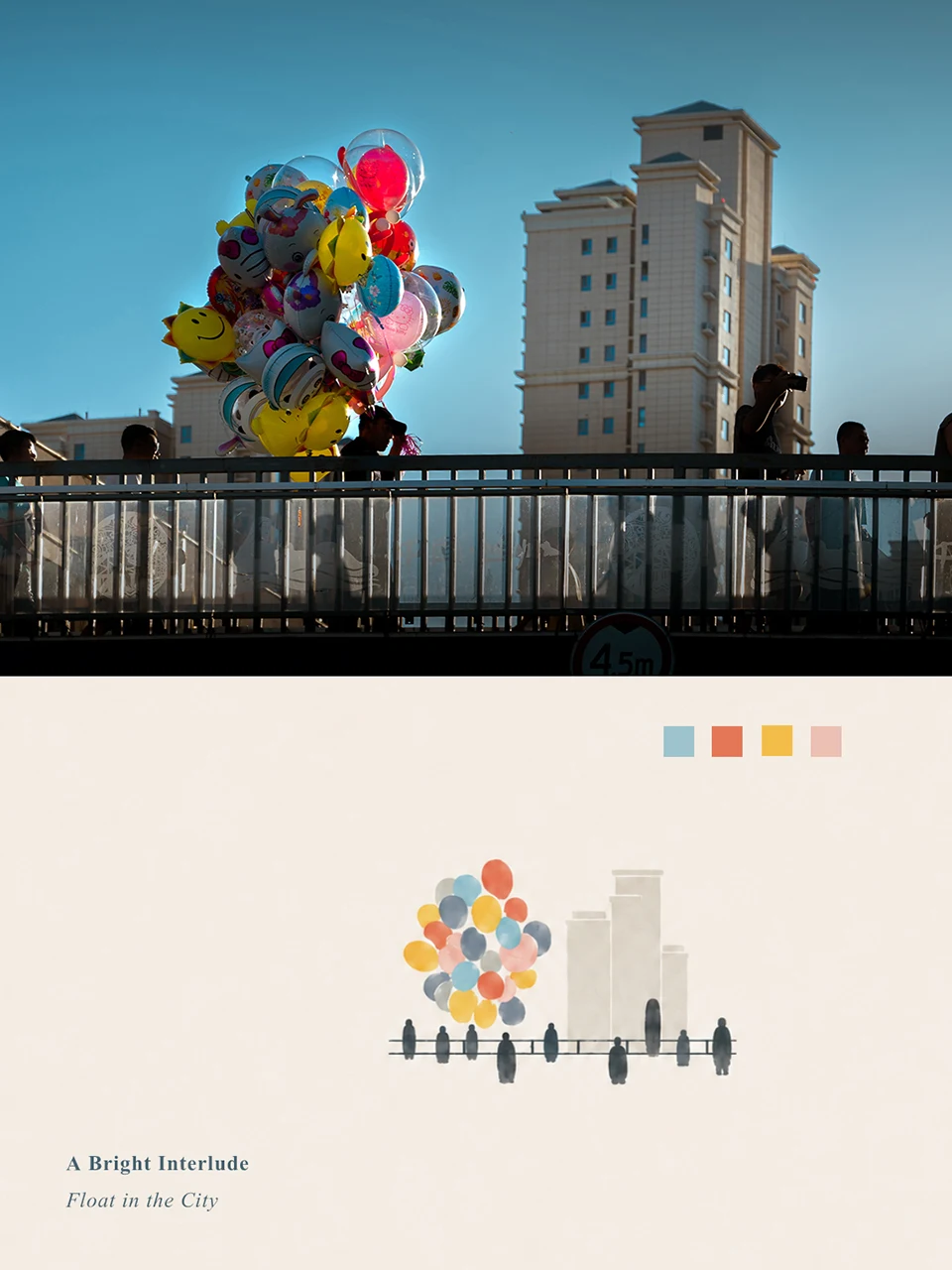
Preserve a photograph, echo its directions, spacing and colors in a sparse lower panel, then add a short English title.
Ways to use it
- Codex
- Tools with image input and generation/editing
- GitHub stars
- 6,018
- Checked
- Categories
- Design & Video
Keep the relationships that make this photograph distinct
Begin with a photo whose directions and layers are easy to see. Check the original-photo area first, then trace the lower panel’s marks back to visible facts. Adjust whitespace, proportions and title placement around those relationships.
Pick a task and get started
Copy the complete skill folder, confirm that the session can accept the original photo and produce or compose an image, then upload one source photo. The three requests below are editorial examples based on the author’s rules; we have not generated their results.
Start with one of your own wide street, coastal or landscape photographs with clear directions, intervals or layers. Make one piece for personal use.
Copy the folder and start a new conversation
Open the pinned repository below and use Code → Download ZIP to download and extract the complete folder. Name the folder directly containing SKILL.md photo-abstract-editorial and copy it into your Codex skills directory as the author describes; their example is ~/.codex/skills/. The entry should resolve to ~/.codex/skills/photo-abstract-editorial/SKILL.md. Keep references/, agents/ and assets/ beside it and avoid an extra enclosing download folder. Start a new conversation. Alternatively, use either complete language prompt linked below with your original photo in a tool that accepts image input.
Read the author’s setup guideBefore the first request: check the photo and image tool
The skill entry should be at ~/.codex/skills/photo-abstract-editorial/SKILL.md, with references/ and agents/ beside it. Start a new Codex conversation, upload one photograph you have permission to use, and confirm that an available image-editing or composition tool can carry that photo into the result. Check credits before proceeding, then send the Scene diptych request. If the session only returns text, use the author’s full prompt and your photo in a tool that accepts image input; the prompt alone is not a rendered artwork.
Read the author’s two usage optionsGive your AI this first task
An editorial request: attach your own original and confirm that an image tool is ready. The author’s workflow keeps the analysis internal and normally returns one finished image only.
Use photo-abstract-editorial with the single landscape-format photograph I have uploaded. Create one vertical photo-and-abstract diptych for personal use. Read the complete English reference prompt first. Internally select three to six decisive spatial facts without returning the analysis. Preserve the original photo above, allowing only proportional scaling or a slight crop at the join; keep the main subject complete. Use a photo height of about 38%–52% as a starting point, adapting to the source rather than forcing a fixed canvas ratio. On a uniform #F3F0E8 ivory panel below, use one primary mark family and at most two supporting families to retain the photo’s directions, intervals and color relationships. Leave generous space. Add no other scene, color swatches or ornament. Place one original two-to-five-word English serif title on the panel, with no subtitle for this attempt. Check photo fidelity, the basis for each mark and title spelling internally, then return only one finished image.
Check what you receive
- Expect one vertical composition with a direct join between the original photograph and a lower panel derived from it.
- Compare subjects, architecture, light and colors with the source. Check for redrawing, retouching or outpainting, and make sure any slight crop keeps the essential subject.
- The panel should preserve identifiable directions, intervals or layers. Check that the title appears once, is spelled correctly, and has no accompanying swatches, labels or watermark.
More about this skill
Photo Abstract Editorial is a Codex skill published by ZzzLc0405. It places a photograph in the upper or principal area and adds a restrained abstract panel below. The photograph supplies the concrete scene; the panel echoes its relative scale, directions, distances, overlaps and colors. A short English title completes the composition.
The assistant first selects three to six decisive visual facts internally, then reconstructs them with one primary mark family and at most two supporting families. Only proportional scaling or a slight crop is permitted in the photographic area. The abstraction adapts to the subject: crowds become irregular continuous vertical marks, landmarks retain one to three identity cues, and balloons or tree canopies become overlapping organic masses.
The repository provides the workflow, complete Chinese and English prompts, Codex interface metadata and author examples. Rendering depends on an image tool you already have access to; installing the skill does not supply a model or credits. Use it with photographs you have permission to process for personal collections, learning or non-commercial sharing. The documented deliverable is one finished image, with no promised layered files or batch exporter.
Sources and verification
Sources checked
We read the pinned README, SKILL, both full prompts, interface metadata and license, and visually inspected three author examples. We did not install the skill or call an image model. Task results describe expected deliverables, not measured outcomes.