Anatomy
Have a coding agent turn a technical mechanism into an isometric object whose parts, motion and readouts share one model. Deliver standalone HTML, static SVG or React components.
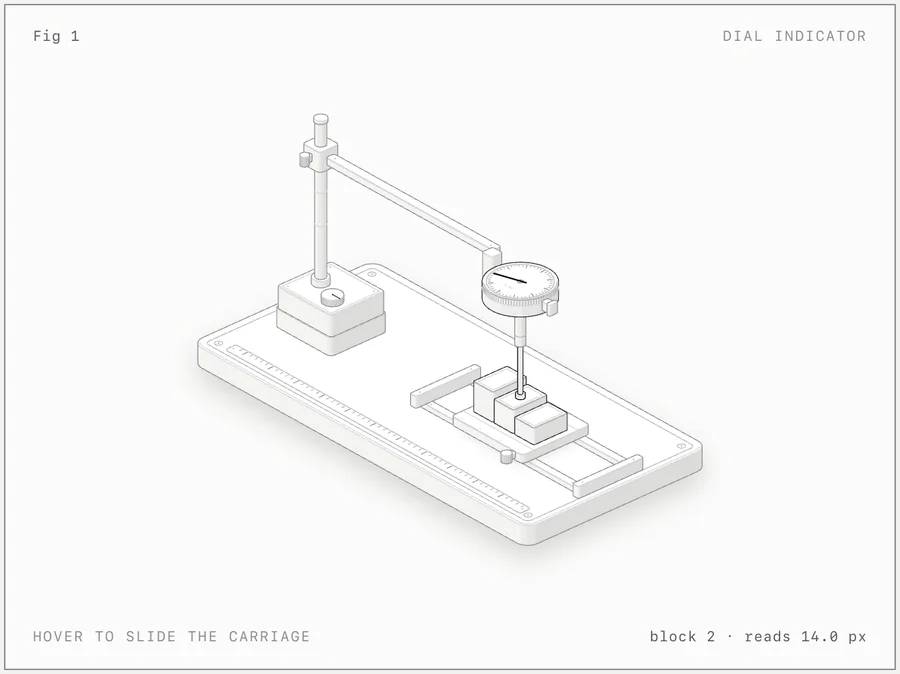 Open the original image
The carriage blocks, probe and dial appear as parts of one object. The displayed block 2 and 14.0 px are example readouts, not calibration measurements from a real instrument.
View the author’s sourceOriginal repository image, MIT © 2026 Ryan. This is one displayed state, not an output generated or run in our review. It does not establish working interaction or passing checks.
Coding agents listed by the author
- Claude Code
- Codex
- OpenCode
- Antigravity
- MiniMax Code
- GitHub stars
- 22,883
- Version
- 1.1.0
- Checked
- Categories
- Design & VideoEngineering
Define one causal relationship before giving it parts.
Start with a small mechanism whose results you can calculate. Specify what each control changes and how the numbers update, then ask the agent to express that behavior through a physical object. This gives you a way to judge both the picture and its explanation.
Pick a task and get started
Install the skill and confirm its files, then choose an output format. The token-bucket task makes a useful first project because its rules and expected numbers are fully specified.
Create a token-bucket teaching page from scratch. The rules, initial state and expected numbers are specified, making this a practical first model-driven figure.
Install & configure
Run the author’s installer command in a terminal and select your coding agent. -g installs for your user; omit it for the current project. At review, skills CLI 1.7.4 requires Node.js 22.20.0+, while Anatomy’s own build tools require 20.10+. Reopen the agent session and confirm that anatomy is loaded before starting.
Read the author’s setup guidenpx skills add wheresryan22/anatomy -gConfirm the skill, source paths and checking environment
Open your coding agent in the prepared directory. Invoke /anatomy in Claude Code; in Codex, confirm it with /skills and invoke $anatomy. Have the agent identify the actual SKILL.md, kit/ and scripts/ paths, then copy editable source and the needed kit into your project with its license. Confirm browser access for checks; use the documented CHROME_PATH setting if Chrome is not found. If the environment prevents a check, leave it unverified rather than reporting a pass.
Read the author’s setup and invocation guideGive your AI this first task
The first three topics draw on the author’s evals, with inputs and acceptance criteria added here; the print task adapts the author’s guide. We did not generate these outputs in our review. Use /anatomy in Claude Code, or replace the prefix with $anatomy in Codex. Substitute your paths, materials and project constraints before sending a prompt to an agent with the skill loaded.
/anatomy In my specified new working directory, build a light-theme isometric token-bucket explainer for beginners as standalone HTML. Rules: capacity 20, initially 20 tokens, refill at 5 tokens per second, and one token per request. Reject immediately when empty; do not queue. Propose the model and physical analogy first, and identify this as a teaching simulation with no real API connection. Separate the simulation clock from display animation. Provide controls to send one request, send 21 at once, advance simulation time by one second, pause and reset. Derive motion, remaining tokens and accepted/rejected counts from one state. Acceptance: after reset, 21 requests at the same instant accept 20 and reject 1, leaving 0; advancing one second then leaves 5. Capacity must never exceed 20, and reset restores the initial state. Deliver HTML, editable build/model source, a project-local copy of the kit and exact rebuild instructions. Connect the supported geometry recorder and audit flow before running the relevant checks; state which poses and exceptions it covers. Open the output and check controls, keyboard, touch, pause/reset, reduced-motion preferences and a 390px layout. Read browser logs and inspect screenshots. Report model tests, geometry checks, visual inspection and unfinished checks separately.
Check what you receive
- A directly openable HTML file, with local source, kit and instructions that can rebuild it.
- Recorded results for the 21 requests and refill step, traceable to controls, physical state and readouts.
- Desktop and phone screenshots, logs and the scope of checks; anything not run remains explicitly unverified.
More about this skill
Anatomy combines a skill for AI coding agents with a local drawing toolkit. The agent first defines a state model, then expresses the idea as a physical structure: capacity might become a vessel, requests become objects entering it, and state changes move its parts. Most geometry is drawn as SVG in code. It is not a hosted image generator, and it does not discover the true workings of an unfamiliar system for you.
Its central design rule is that motion and readouts come from the same model. Standalone HTML supports controls and animation; static SVG works in articles; the React route separates static art from client behavior for an existing site. The current main branch also has an A4 printing workflow for completed light-theme figures. Optional WebGL overlays and a beta 3D route are not prerequisites for a first task.
This guide follows a pinned main-branch commit. The latest release tag is still v1.1.0 at an earlier commit, while printing and other additions appear under Unreleased. Check the installed files instead of assuming the release label includes every feature. The four tasks below are editorial examples with explicit acceptance criteria; the author’s dial-indicator image is identified separately.
Sources and verification
Sources checked
We checked pinned author documentation, the relevant drawing/React/printing entry points and checking scripts, and viewed the original example image. We did not install or run the author’s tools, generate the task outputs or verify generation quality.